Problem
Physical logs are a single-point failure—poorly maintained by guards and untrusted by residents. Guard apps often fail due to poor connectivity.
Mobile-first visitor management and gate security for societies, campuses, and gated communities.
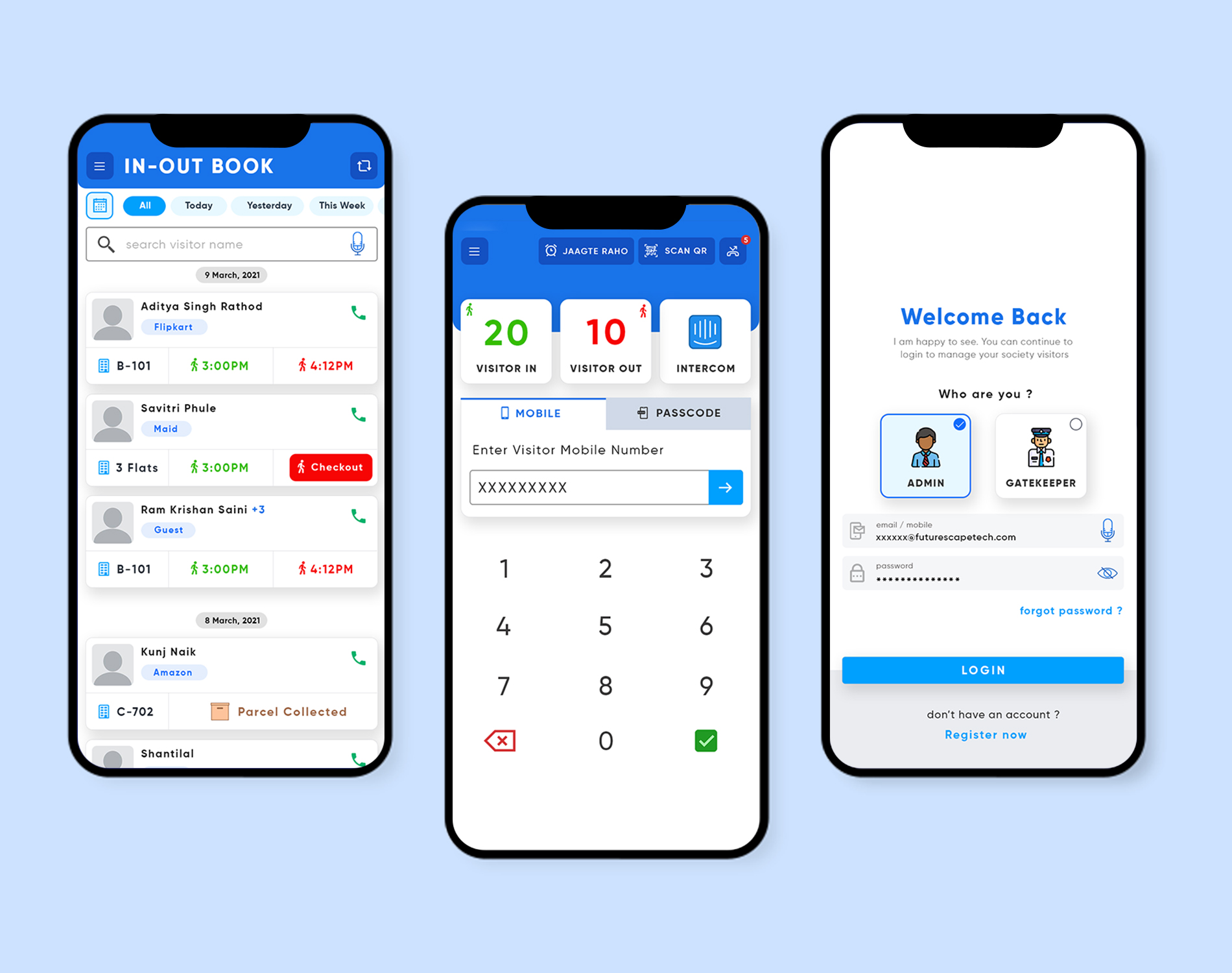
OneGate is a mobile-first visitor management and gate security system built for residential societies, corporate campuses, and gated communities across India. The client, CubeOne, needed a product that could replace the physical visitor log book — a single-point failure that guards never maintained consistently and residents rarely trusted. I was brought in as the product designer responsible for both the resident-facing mobile app and the security guard tablet interface — two distinct user types with almost opposing interaction models. The resident wants speed and visibility: approve a visitor in under ten seconds. The guard needs reliability: a system that works offline, handles poor connectivity, and presents information without ambiguity. Designing two coherent experiences within one product was the central design challenge. Alongside UI and UX, I defined the overall product structure, created the information architecture, and validated key flows with security personnel at two pilot societies before the v1 launch.
Visitor management sounds simple until you observe it in practice at a real gate. In a 300-unit society, the guard on duty may handle 150+ visitors per shift across pedestrians, vehicles, delivery personnel, and domestic help — each requiring a different level of scrutiny. The existing paper log created zero accountability. The digital replacement had to work faster than paper, or guards would abandon it. We set a target of under 45 seconds for a complete visitor entry. The resident approval flow introduced its own complication: residents increasingly ignore app notifications. If the approval system relied purely on in-app push notifications, guests would be left waiting at the gate. The fallback notification path — SMS, then a gate intercom call — had to be built into the product design, not treated as an afterthought. Another constraint was device diversity: security guards were given entry-level Android tablets with variable screen sizes and slow processors. Every interaction had to be designed with a 2G connectivity assumption.
Physical logs are a single-point failure—poorly maintained by guards and untrusted by residents. Guard apps often fail due to poor connectivity.
Design a reliable system catering to two opposing user types: speed-focused residents and reliability-focused guards.
Designed both resident mobile app and security guard tablet interfaces, defined IA, and validated flows with pilot societies.
Research for OneGate was field-based. I spent three days across two gated communities in Navi Mumbai, conducting structured observations and semi-structured interviews. I spoke with six security guards across two shift types, eight residents, and two society management committee members. The guards’ feedback was blunt and invaluable: they had tried three previous digital systems and abandoned all of them because the apps froze or required stable internet. Trust in technology was near-zero. This told me the guard-facing app needed an explicit offline mode with local data queuing. For residents, the key insight was that they did not want to open the app for every visitor — they wanted to pre-approve frequent visitors once, and have the system handle them automatically thereafter.
Strategy came from three days standing at real gates. Guards had abandoned three previous digital systems because they froze or needed stable internet — trust in technology was near zero. So the entire product was architected around one non-negotiable: the guard experience must work offline, every single time. The resident app and the guard app were designed as two separate products with one shared data core, because their constraints barely overlap.
Entries queue locally and sync when connectivity returns. Offline mode became non-negotiable overnight.
The visitor scans a QR and enters their own details. The guard verifies with one tap instead of typing free-text names.
Residents wanted to stop opening the app for every guest. Frequent Visitor Passes handle recurring visitors automatically.
The resident app and guard tablet were designed as separate experiences sharing only the event stream underneath.
If a resident hasn't approved within 60 seconds, the flow escalates to SMS and then to the gate intercom.
Testing revealed security personnel working in winter wore thick gloves. Every primary action grew to a minimum comfortable hit area.
Name fields are captured from visitor input. The guard confirms identity with a photo tap — reducing entry time to 41 seconds.
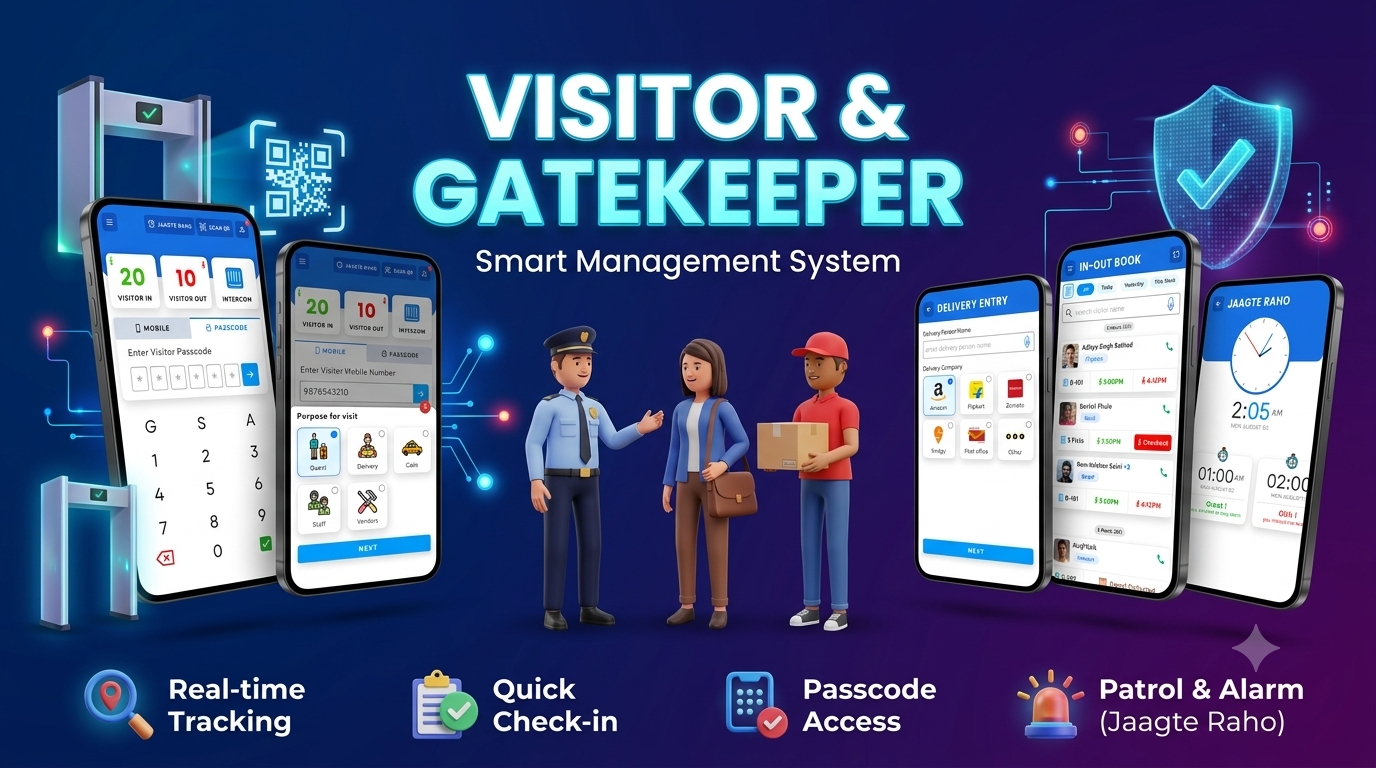
residents invite expected guests in advance, generating a one-time entry code.
visitors scan a QR code at the gate; guards verify with a single camera tap.
instant push notification with approve/deny action, SMS fallback if unread within 60 seconds.
permanent or time-limited passes for domestic staff and regular contacts.
auto-generated entry slip with visitor photo, unit number, and timestamp.
large-tap tablet UI showing current visitors, pending approvals, and flagged entries.
searchable timestamped record of every entry and exit event.
one-tap broadcast to all residents and society admin for security incidents.
admins can manage multiple communities under a single account.
real-time count of current visitors inside the premises.
separate entry flow for e-commerce and food delivery personnel.
guard app queues entries locally and syncs when connectivity is restored.
web dashboard for committee management, guard scheduling, and analytics.
number plate capture with OCR assist for vehicle entries.
Gate entry time fell from over four minutes with paper to 41 seconds with OneGate, and guards kept using it after the pilots ended. The offline-first decision converted the product into the log societies actually rely on.
OneGate reinforced a principle I return to often: design for the least-served user first. The security guard — typically overlooked as a secondary user — was actually the most critical. Designing for low-literacy, low-device, low-connectivity conditions made the product more resilient across all user types.